Why do sensitivity modes and estimated detection sensitivity change?
Did you know that a metal detector generates a magnetic field with an optimum frequency to accurately detect changes in the effects of the product being inspected when metal contaminants are mixed in and when they are not mixed in? Each metal detector manufacturer uses different setting procedures, but the mechanism is the same to detect changes in the magnetic field that occur when a metal contaminant passes through a tunnel-shaped detection head (magnetic field tunnel). Anritsu metal detectors start operation after first selecting a sensitivity mode, which is a combination of magnetic field frequencies with different characteristics. This paper explains about the sensitivity mode.
Frequency combination "Sensitivity Mode"
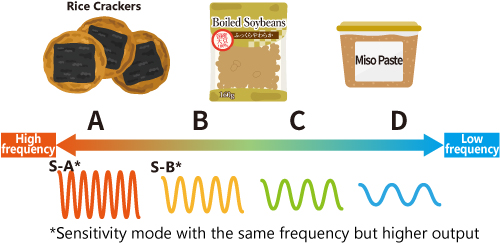
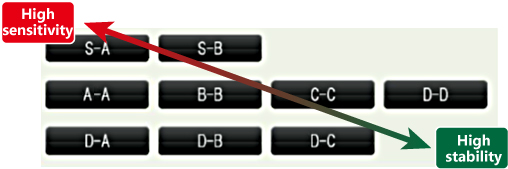
In our metal detectors, magnetic field frequencies with different characteristics are represented by the alphabets A, B, C, and D, and the frequency decreases in the order of A → B → C → D. Wet products contain salt or liquid, which easily conducts electric current and disturbs the magnetic field, so a lower frequency D is selected. On the other hand, dry products tend to be selected with a high frequency of A because they are less likely to conduct electric current and disrupt the magnetic field.
However, even dry products such as supplements may contain substances that easily conduct current, so B or C may be selected.
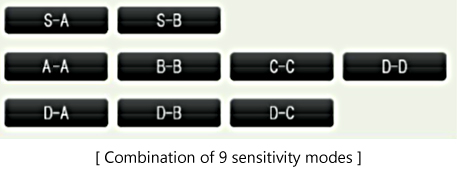
Our metal detector employs a dual - frequency technology that determines the best frequencies to maximize sensitivity for both ferrous and non-ferrous metals simultaneously. Therefore, one of the "sensitivity modes" (of which there are nine), which combine two magnetic field frequencies with different characteristics as shown in the figure on the right, is selected to detect metal contaminants.
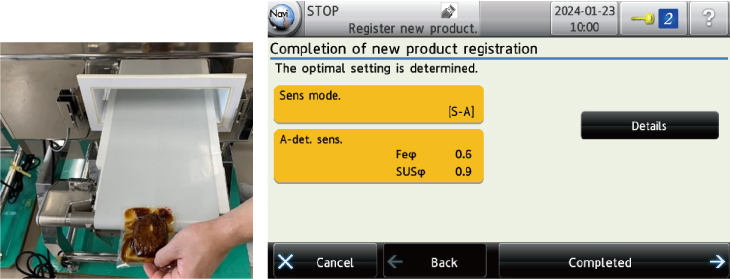
At the time of setting to register the characteristics of the product in the inspection machine (Anritsu calls it "product registration and automatic setting", hereinafter "auto-setting"), the same individual product is passed through the detection head of the metal detector 12 times and *, as shown below, the metal detector
automatically selects the optimal sensitivity mode for the product and replaces the estimated detection sensitivity with the diameter of sphere test pieces of Fe and SUS.
* The number of settings for the latest model M6-h. The number of feeding will vary for different models.
Sensitivity mode changes depending on the nature of the product
Experiment 1
We conducted an experiment using a sponge as a food sample to see how the selected sensitivity mode changes due to differences in product effect on the same test item. A dry sponge has a small effect on the product, but adding moisture and salt increases the effect on the product.
The table on the right shows the results. Now, let's take a look at the details.
| Condition |
Sensitivity mode |
Estimated detection sensitivity (mm) |
| Dry |
[ S-A ] |
Fe φ 0.6 SUS φ 0.9 |
| Lightly soaked in water (semi-wet) |
[ S-B ] |
Fe φ 0.7 SUS φ 1.1 |
| Immersed in salt water (wet) |
[ D-A ] |
Fe φ 0.7 SUS φ 2.1 |
Dry Sponge = Product Effect "Small"
Sensitivity mode [S-A] was chosen because it does not contain water or salt and the magnetic field is less likely to be disturbed.
![Sensitivity mode [S-A]](https://dl.cdn-anritsu.com/images/infivis/en-en/knowledge-center/technical-note/vol20/technical-note-vol20-fig4-e.jpg)
Lightly Immersed in Water = Product Effect "Medium"
When lightly soaked in water, the displayed frequency changed to [S-B], a one-step lower mode, unlike before.
![Sensitivity mode [S-B]](https://dl.cdn-anritsu.com/images/infivis/en-en/knowledge-center/technical-note/vol20/technical-note-vol20-fig5-e.jpg)
Immersed in Salt Water = Product Effect "Large"
Since it contains a lot of salt and water, the disturbance of the magnetic field becomes large, so [D-A] was selected.
![Sensitivity mode [D-A]](https://dl.cdn-anritsu.com/images/infivis/en-en/knowledge-center/technical-note/vol20/technical-note-vol20-fig6-e.jpg)
Considering only the estimated detection sensitivity of [S-A] and [D-A], [S-A] seems to be superior, but it is not so simple. Let's feed the product with the [D-A] setting in [S-A] mode. You can see that it is strongly affected by the product being inspected and causes false rejections. From this, you can see that stable inspection cannot be performed unless the appropriate sensitivity mode is used.
Why choose other sensitivity modes?
In the previous experiment, we mentioned that the sensitivity mode changes depending on the properties of the product to be inspected, but here we will explain the case where it is better to change the sensitivity mode arbitrarily instead of automatically depending on the item, even if it is the same item.
When we performed the auto-setting with a refrigerated hamburger as shown below, Sensitivity Mode [S-A] was selected.
![Sensitivity mode [S-A] is selected](https://dl.cdn-anritsu.com/images/infivis/en-en/knowledge-center/technical-note/vol20/technical-note-vol20-fig9-e.jpg)
As stated at the beginning of this paper, "Wet products contain salt or liquid, which easily conducts electric current and disturbs the magnetic field, so a lower frequency D is selected." However, our latest model, M6-h, can reduce product effect thanks to its unique algorithms. It can select a higher frequency sensitivity mode to better respond to metal contaminants for enhanced detection sensitivity.
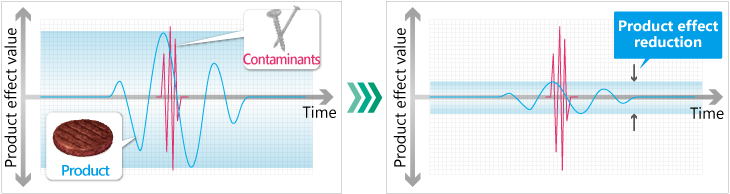
The manufacturers generally recommend using the sensitivity mode after performing the auto-setting, but inspecting wet items in high sensitivity mode may trigger false rejections. This is one of the common issues that often arises on a production line. In the auto-setting that selects a sensitivity mode by feeding the same test item 12 times, the frequency comes too high that leads to false rejections because the auto-setting is not capable of considering in-production variations in quality on the actual production. Variation can occur due to several factors such as mass, composition, and product temperature.
Experiment 2
![Sensitivity mode [S-A]](https://dl.cdn-anritsu.com/images/infivis/en-en/knowledge-center/technical-note/vol20/technical-note-vol20-fig11-e.jpg)
In the sensitivity mode [S-A], feed hamburg steaks of the same product continuously into the machine to see how the product effect changed. Because the green waveform is not constant due to variations in the products and false rejections may occur on the actual production line.
![Sensitivity mode [D-B]](https://dl.cdn-anritsu.com/images/infivis/en-en/knowledge-center/technical-note/vol20/technical-note-vol20-fig12-e.jpg)
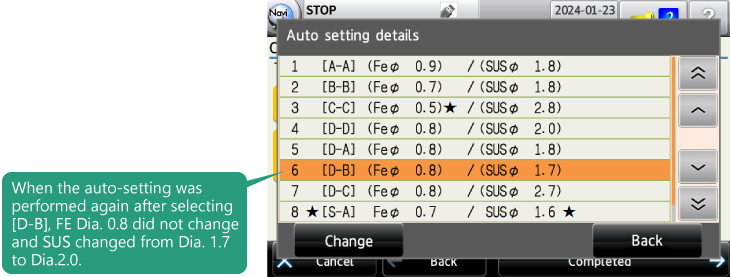
We feed the same individual hamburg steak 12 times again and perform the auto-setting, and confirm [S-A] was selected again. Then press the "Details" tab, and select [D-B], which has a lower frequency than [S-A] displayed on the "Auto setting details" screen and perform the auto-setting. This time, it will be completed if the product was fed three times.
The estimated detection sensitivity of SUS decreased from Dia.1.6 to Dia.2.0, but in contrast to the previous [S-A], the product effect was stable, indicating that false rejections did not occur.
If false positives occur frequently in actual production even though you have performed the auto setting according to the guidance, press the "Details" tab displayed on the screen and select a lower frequency instead of the sensitivity mode initially selected to solve the problem effectively.
The sensitivity mode changes from high sensitivity to high stability as shown in the right figure.
(Note) If the test piece size is specified by the internal standards, please start production only after checking whether the test pieces can be detected on the product in the new sensitivity mode.
Conclusion
In this paper, you learned that there is a "sensitivity mode" determined by the magnetic field strength and magnetic field frequency, that it is automatically selected or changed according to the properties of the product. Anritsu's metal detectors display estimated sensitivities with different modes, so when false rejections occur frequently, you can choose another mode considering the balance between sensitivity and stability. We hope you utilize this feature to improve quality and productivity.
Related Links
PDF >
Technical Note (For general use) >
Products & Solutions > Metal Detection >
Glossary: Metal Detectors >
